
 Your location:Home → instrumentation and meters → tachometer → Speed recorder → SQY08T220-4SX Intelligent speedometer
 |
Product name: | SQY08T220-4SX Intelligent speedometer | |||||
| specification: |   Zoom in on the image Zoom in on the image |
||||||
| Category: | instrumentation and meters -- Speed recorder | ||||||
| |
Price: | factory price | |||||
| Brand: | Shanghai | ||||||
| Place of Origin: | China | ||||||
| |
Available Quantity: | batch | |||||
| delivery cycle: | Spot goods (or inquire by telephone) | ||||||
 |
|
||||||
1、 Overview:
SQY08T220-4SX intelligent speedometer is a new generation of intelligent speedometer that uses a new single-chip microprocessor as the main chip. This product can be matched with various speed sensors such as proximity switches, Hall sensors, and photoelectric sensors to measure speed, linear velocity, flow rate, and angular velocity. It is widely used for speed monitoring of large equipment such as ships, power plants, power plant chemicals, metallurgy, etc.
The following will introduce the performance and operation of the intelligent speedometer in order to effectively and reasonably use it.
2、 Main technical performance of SQY08T220-4SX intelligent speedometer:
1. Power supply: AC220V, 50Hz
2. Input signal frequency: 0.5-10000Hz
3. Input signal amplitude: 0.3V~12V
4. Speed measurement range: 15-99999r/min
5. Display range: 15-99999r/min (with direction indicator)
6. Basic error: ± 0.03% (digital display)
7. Setting range: coefficient 0.0001 to 99999
8. Sampling time: 0.1S to 10S
9. Operating environment: Temperature range of 0-50 ℃
Relative humidity ≤ 85%
10. Hole size: 92 × 92
11. Dimensions: 96 × 96 × 110
12. Weight: less than 1.0kg
3、 Operating instructions:
Before formal use, power on the display device and it should display "88888." Within 10 seconds, it should display "0.
2. Parameter setting:
a. The "Settings" button is a parameter setting gear shift button. Press the "Settings" button to enter the setting state, and display A, B, C, D, E, and F in sequence.
b. The 'Left Shift' key is the left shift key. Press the 'left shift' button to flash and display decimal points in the order of one, ten, one hundred, one thousand, and ten thousand digits.
c. 'Add' is the plus 1 key. Press' add up ', the flashing position will increase by 1; When the decimal point is displayed, press the "add" button to move the decimal point to the left; When the E mode is displayed and a decimal point appears, press the "add" button to confirm and save the set parameters, and exit the setting state at the same time.
d. This instrument has six parameters: A, B, C, D, E, and F. A represents the coefficient (set to "1.0." at the factory); B represents the zero adjustment value (not defined locally); C represents the alarm J1 set value (set to "4000." at the factory); D represents the decimal place of the full-scale and displayed values (not defined locally); E represents the alarm J2 set value (set to "1000." at the factory). When the decimal point of the E parameter appears, the user is asked if the parameter has been set. If the "add" button is pressed, the parameter setting is completed and the setting state is exited; F represents the sampling time (set to "10" at the factory, indicating 1 second). And when F is an even number, the instrument is the main meter and connected to the sensor; When F is singular, the instrument becomes an external display, serving as an external display for the main meter.
e. The combination of the "Set", "Move Left", and "Add Up" keys can set each parameter bit by bit, and the decimal point can be moved to achieve any number setting within 0.0001 to 99999.
f. Press the 'reset' button, and the machine will be in the initial startup state.
Method for restoring factory settings:
Press the "Reset" and "Left Move" buttons, release the "Reset" button first, then release the "Left Move" button, press the "Set" button to enter the setting state, and display A, B, C, D, E, F in sequence:
A=1.0,B=1217,C=4000.,D=6250,E=1000.,F=20;
When the decimal point of parameter E appears, press the "add" button to complete the factory parameter setting.
3. Parameter calculation method:
This instrument converts physical quantities such as rotational speed, angular velocity, linear velocity, and flow rate into pulse frequencies through corresponding sensors, and then measures them. The final step is to measure the frequency and multiply it by an appropriate coefficient to enable the instrument to directly read the physical quantity.
Calculation formula: A=60/P
A represents the set coefficient
P represents the number of pulses per revolution of the sensor
When the measured rotating object rotates one revolution, the number of transmitted pulses is 20, and the display unit is r/min,
A=60/20=3。
4. Provide examples to illustrate the settings of coefficients and parameters.
Set coefficient A to 12.345 and parameter C to xxx.xx.
Press the "Settings" button. When A appears, press the "Left Shift" shift button. When the position flashes, press the "Up" button to increase the position to 5; Press the 'left shift' button again, and when the ten digits flash, press the 'up' button to increase the digit to 4; Press the 'Left Move' shift button again, and when the hundred digits flash, press the 'Up' button to increase the digit to 3; Press the 'Left Move' shift button again, and when the thousand digit is flashing, press the 'Up' button to increase the digit to 2; Press the 'left shift' button again, and when the ten thousand positions flash, press the 'up' button to increase the position to 1. Press the "Move Left" shift key, and when the decimal point appears, press the "Add Up" key to move the decimal point to the left, making A 12.345.
Press the "Set" button, and when B appears, set the zero adjustment value in the same way as A; the decimal point should be the same as C.
Press the "Settings" button, and when C appears, set the alarm J1 value in the same way as A.
Press the "Settings" button, and when D appears, set the full range in the same way as A; the decimal point should be the same as C.
Press the "Settings" button, and when E appears, set the alarm J2 value in the same way as A. If you press the "Left Shift" shift button until the decimal point appears, then press the "Up" button to confirm and save the set parameters, exit the setting state, reset and enter the working state.
Press the "Settings" button, and when F appears, set the sampling time. 1 represents 0.1S, 2 represents 0.2S... 20 represents 2S.
When the minimum alarm value is singular, the corresponding alarm output is the lower limit alarm output;
When the lowest value of the alarm is even, the corresponding alarm output is the upper limit alarm output.
5. Wiring diagram:
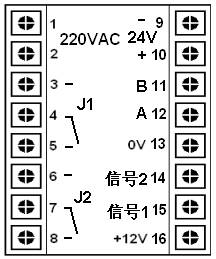
Main meter wiring terminal instructions: (When the instrument parameter F is an even number)
AC 220V: working power supply for speed digital display instrument;
DC 24V: backup working power supply;
Either of the two groups can ensure the normal operation of the instrument;
+12V, 0V: Provide+12V working power supply to the Hall sensor;
Signal 1: Connected to the output terminal of Signal 1 of the sensor;
Signal 2: Connected to the output terminal of signal 2 of the sensor; (When there is no requirement for directional discrimination, signal 2 may not be connected)
J1: Alarm relay 1, 3, 4: normally open end, 4, 5: normally closed end;
J2: Alarm relay 2, 6, 7: normally open end, 7, 8: normally closed end;
A. B: Instrument cascade terminal, can be connected to similar instruments for remote display control.
Instructions for wiring terminals of external display: (When the instrument parameter F is singular)
Connect the A and B terminals of the external monitor to the twisted pair of the main meter A and B terminals, and connect the power supply (AC 220V or DC 24V)
The external display synchronizes with the main meter to display the speed, and the usage and setting method of the alarm relay are the same as those of the main meter.
The main table is exactly the same as the external display, except that when the parameter F is changed to an odd number, it is used as the external display.

 Related Products:
 SQK-LCM7.0-SOM-01 speedometer SQY12-01 speedometer SKY125-4 Intelligent speedometer DT5TS Panel mounted rotation speedometer DJS- Type II locomotive speedometer SZE-01 Intelligent Desktop Digital Speedomete.. SZE-02 High precision digital speedometer SQY01T105 Intelligent speedometer SKY-04 Intelligent speedometer SQY12-04 Dual channel high-precision intellig.. Related articles:
 Electrical instruments Digital Display Instrument Temperature Instrument Humidity meter Pressure gauge flow meter analytical instrument Level instrument tachometer
  tachometer speedometer anemometer Line speedometer odometer accelerometer speed sensor Speed recorder
  speed controller Speed Transmitter Accelerometer Recording instrument weighing instrument Specialized instruments
 Home|Quality Commitment|Ordering|Payment method|product delivery|support|Disclaimer|Contact Us
Copyright®2011 www.91way.com Copyright.
Phone:+86-21-66770508 +86-13916500500 Fax:+86-21-66108310
Email:91way@163.com Wechat:40606422
沪ICP备2021005791号  沪公网安备31010702003255号

