
 Your location:Home → instrumentation and meters → Electrical instruments → phase sequence meter → HX1-1 Type Nucleus Phaser
 |
Product name: | HX1-1 Type Nucleus Phaser | |||||
| specification: |   Zoom in on the image Zoom in on the image |
||||||
| Category: | instrumentation and meters -- phase sequence meter | ||||||
| |
Price: | factory price | |||||
| Brand: | Shanghai | ||||||
| Place of Origin: | China | ||||||
| |
Available Quantity: | batch | |||||
| delivery cycle: | Spot goods (or inquire by telephone) | ||||||
 |
|
||||||
Usage of HX1-1 Nuclear Phaser (PC)
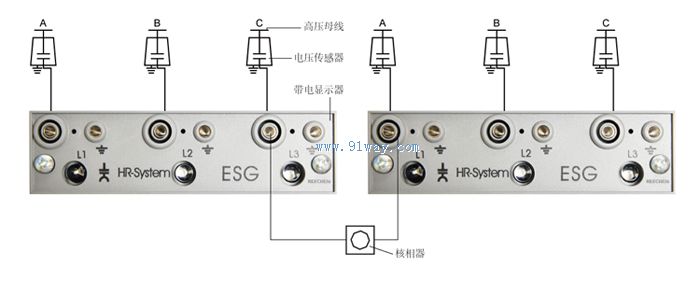
Before checking the phase, it is necessary to ensure that the internal wiring of the high-voltage switchgear is correct, that is, the phase sequence of the connecting wires between the assembled voltage sensor and the live display should be correct. When two high-voltage power sources are supplying power normally, the following operations can only be carried out after confirming that the live displays on each power switch cabinet are indicating normally:
First, insert the plug on one end of the phase detector into the L1 phase test terminal on the live display panel above the commissioning switch cabinet. Then, insert the plug on the other end of the phase detector into the L1, L2, and L3 phase test terminals on the live display panel above the pending power switch cabinet, and observe the illumination of the phase detector indicator light (see the diagram on the right for testing instructions):
If the actual phase is not consistent, the indicator light of the phase detector will light up.
If the actual phase is consistent, the indicator light of the nuclear phase detector will not light up;
Note: Single phase to ground can be used as a voltage tester
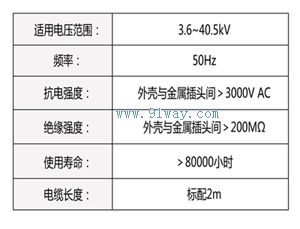
Technical Parameters of HX1-1 Nuclear Phaser (PC)


 Electrical instruments
  Q meter bridge ammeter voltmeter Voltammeter frequency meter power meter electricity meter multimeter clamp meter ohmmeter phase sequence meter
  electroscope oscilloscope Distortion meter Load devices Panel instrument power meter L and C meter Internal Resistance Tester Withstand Voltage Tester signal generator signal isolator SENECA Transducers Voltage loss timer T_characteristic instrument Digital Display Instrument Temperature Instrument Humidity meter Pressure gauge flow meter analytical instrument Level instrument tachometer Recording instrument weighing instrument Specialized instruments
 Home|Quality Commitment|Ordering|Payment method|product delivery|support|Disclaimer|Contact Us
Copyright®2011 www.91way.com Copyright.
Phone:+86-21-66770508 +86-13916500500 Fax:+86-21-66108310
Email:91way@163.com Wechat:40606422
沪ICP备2021005791号  沪公网安备31010702003255号


